How To Design a Spreadsheet ETL Pipeline
Pulling data from spreadsheets is tough to get right. There are numerous pitfalls that come from dealing with unstructured data that humans enter as they see fit. This article will describe a few considerations around how to design a spreadsheet ETL pipeline that won't fail the moment somebody adds a typo to a column header or adds a field.
We'll start off with the following basic spreadsheet style and then discuss variations and modifications from there. Let's assume you have a spreadsheet about sales reps goals with a few columns like their ID, Name, Title, and Sales Goal like this:
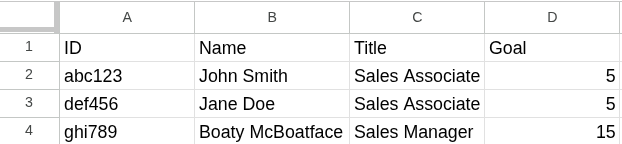
We'll also assume that there will be one of these spreadsheets per month rather than a continous spreadsheet with a date or month indicator.
The sample workbook you were given starts at cell A1 and there's nothing else on the sheet. Your first instinct might be to build a script / process / workflow that simply ignores the header row and maps column A to id, column B to name and so on and then you insert into a table like this:
erDiagram
    sales_reps {
        datetime _etl_at "default(now())"
        text filename
        text tabname
        text row_number
        text id
        text name
        text title
        number goal
    }
You run the script and have this data in your table:
| _etl_at | filename | tabname | row_number | id | name | title | goal |
|---|---|---|---|---|---|---|---|
| 2026-08-10T12:34:56Z | targets_june_2026.xlsx | sheet1 | 2 | abc123 | John Smith | Sales Associate | 5 |
| 2026-08-10T12:34:56Z | targets_june_2026.xlsx | sheet1 | 3 | def456 | Jane Doe | Sales Associate | 5 |
| 2026-08-10T12:34:56Z | targets_june_2026.xlsx | sheet1 | 4 | ghi789 | Boaty McBoatface | Sales Manager | 15 |
Challenge 1 - Hardcoded Assumptions
Ingesting unstructured and user-entered data has the inherent problem of those humans entering things incorrectly. July's spreadsheet is released and someone wanted things to look nicer, so they left column A and row 1 blank to give themselves some spacing.
Your script runs and id is null, name contains the ID, title contains the name, goal contains the title and the actual goal isn't captured at all. Or the insert fails because you cannot insert Sales Manager into a numeric column.
Solution
No problem, you modify your script to look for a cell that contains ID, followed by Name and use that as your starting point, re-run the script and everything is fine until...
Challenge 2 - Inconsisten Column Headers
Someone renamed the ID column to Rep ID or left a space in there so the cell reads ID .
Solution
The way to solve for this is by extracting the header row programatically and apply some data cleaning to it like downcasing, removing leading and trailing whitespace, replacing special characters with words like Commission % becoming commission_percent.
However, this presents another problem. You now have a new column rep_id, leading to either id being null, or your pipeline failing because it tries to insert into a non-existent rep_id column.
Introducing the "Other" Column
Most databases these days support JSON column types. PostgreSQL has its built-in JSONB data type, Snowflake has VARIANT, or worst case, just make it a text column. In order to prevent a possible name conflict with a Spreadsheet column called Other I'd suggest calling it ___other.
The idea on how to use this column is relatively simple. Your script gets a list of expected columns (ID, Name, Title, Goal in this case) and whatever column name comes out of your sanitizing function is either in that list or not. For any columns not in the list, you add them as key-value pairs into the ___other column. That means this spreadsheet tab:
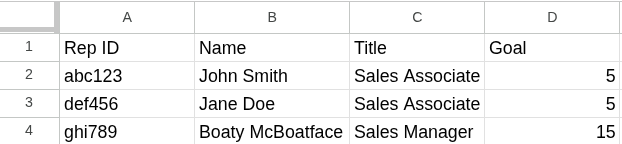
will be ingested like this (metadata columns excluded for brevity):
| id | name | title | goal | ___other |
|---|---|---|---|---|
| null | John Smith | Sales Associate | 5 | {"rep_id": "abc123"} |
| null | Jane Doe | Sales Associate | 5 | {"rep_id": "def456"} |
| null | Boaty McBoatface | Sales Manager | 15 | {"rep_id": "ghi789"} |
Advantages
- Your ingestion script is far more robust now and can handle most changes to column headers, as long as you can still find where "the table starts" in your script.
- You can set automated alerts and data tests in your data processing steps. For example, when a spreadsheet is ingested in PostgreSQL you could run something like
select distinct JSONB_OBJECT_KEYS(___other) from your_table WHERE filename = 'XXX'withXXXbeing the name of the spreadsheet you just loaded. If this query returns rows, you might have a problem to look at! - You can make accomodations in your data build pipeline. The staging data model for the sales reps goals can change from
SELECT id, ...toSELECT COALESCE(id, ___other->>'rep_id') as "id"and everything works downstream!
Disadvantages
- Since
___otheris a JSON key-value pair object, you have to be conscious of duplicate column names. If the source spreadsheet has things like multipleamountcolumns, your sanitation function needs to handle that in a way that is consistent across multiple runs of the script. For example, if you start adding numbers likeamount_1,amount_2, you need to make sure thatamount_1is always the first amount column.
Key Takeaways, Tips, and Considerations
- For any given spreadsheet, consider whether you want an ingestion to fail or not when something is off with the data. There are lots of scenarios where you want to make sure changes fail loudly so that no enduser might look at bad data. In the
IDvs.Rep IDexample above, it might be worthwhile to fail loudly, so that nobody can run a commission calculation based on ID that does not include a specific spreadsheet. - Include metadata in your output data models. When the latest
_etl_attimestamp is is from last week, it will (hopefully) make someone pause before running payroll. - Ingest as text, cast in your data modeling pipeline. Spreadsheet data can be weird and formatting can affect how the underlying data is stored. If you make a column that holds a currency amount
numericand your ingestion fails because the raw text coming from the spreadsheet is suddenly$123.45instead of123.45, stakeholders lose trust quickly. This is even worse if you try to add cleansing logic in the extraction process and ingest the above value asnullbecause it does not contain only numbers, periods, and dashes. This kind of thing is done much more reliably in a data processing SQL layer when the data is already in your warehouse. - When cleaning important values in SQL, add test logic into an intermediary step. For example, if you use a regular expression to extract currency data from a text column, don't just extract and move on. Add a second column that returns true/false if your pattern did or did not find a match. That way you can easily filter your data via that boolean to check if your logic is working correctly.
Whatever You Do, Don't Do This
One of the worst spreadsheet pipelines I have seen was produced when someone threw a few sample spreadsheets into AI and had it generate the extraction logic. In order to make sure that variations and misspelled columns ingested correctly, the LLM decided to have a large mapping object for column headers it could find and what database table column they should turn into. It looked something like this:
{
  "comission": "commission",
  "commission": "commission",
  "commision": "commission",
  "Comission": "commission",
  "Commission": "commission",
  "Commision": "commission",
  "sales comission": "commission",
  "sales commission": "commission",
  "sales commision": "commission",
  "Sales Comission": "commission",
  "Sales Commission": "commission",
  "Sales Commision": "commission",
  " Sales Commission  ": "commission"
}
That mapping object had over 200 entries in it and of course failed the moment it encountered a column that was not in its list.
I hope you found this article informative. If you have any questions, feel free to reach out to me on LinkedIn!